UA
UA RU
RU EN
ENWhat it does
Hears
Takes subtitles or transcribes the voice with a local speech recognition model.
Sees
Grabs frames where the scene changes, so it does not miss interface states, slides or demos.
Connects
Links what was said to what is on screen by timecode.
Delivers
A review, a QA table, a competitor comparison, a UX audit, call minutes or lecture notes.
Example: a QA table from a walkthrough recording
Each finding has a screen, timecode, frame, tester quote, expectation, suggestion and severity. You pick the format: the skill asks if you did not name one.
- Works with video links, screen and meeting recordings and local files
- Compares several recordings, for example competitor walkthroughs
- Every finding is backed by a frame and a quote from the recording only
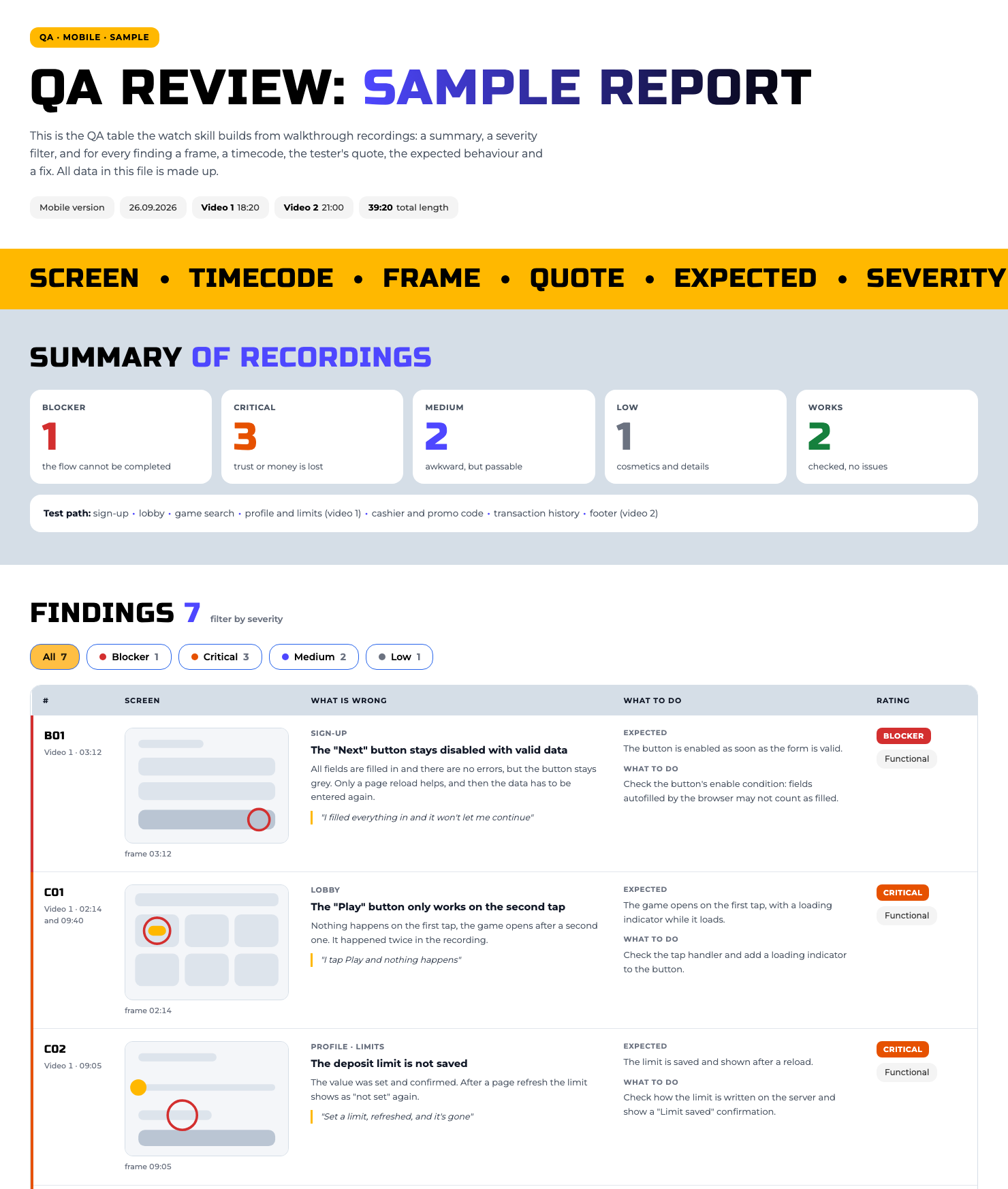
An example from the repository. The data is fictional.
Install
Option 1. Let Claude install it
Open Claude Code and paste this text:
Install the watch skill from https://github.com/igamingsychov/watch-igaming :
1. Clone the repository into ~/.claude/skills/watch. If that folder already exists, ask me what to do.
2. Check that yt-dlp, ffmpeg and whisper are installed. If anything is missing, show the install commands and ask for permission.
3. Tell me when you are done and what to type to test it.
Option 2. Two terminal commands
The first puts the skill where Claude Code looks for it, the second checks and installs what is missing:
git clone https://github.com/igamingsychov/watch-igaming.git ~/.claude/skills/watch
bash ~/.claude/skills/watch/install.sh --deps
How to use it
Example requests
- watch this video and write a review: link
- review the walkthrough recording and build a QA table
- here are three competitor walkthroughs, compare them
- go through this call recording and write minutes: topic, decision, owner, deadline
Privacy and license
The skill runs on your computer. Working files live in a temporary folder and do not end up in your project. It does not get around videos behind a login.
MIT license: use it and adapt it. Author: Yevhen Sychov.